CricFy TV
Cricfy app offers live cricket, scores, HD streams and more. Learn about Cricfy app APK, Cricfy app Download, and available features

cricfy app
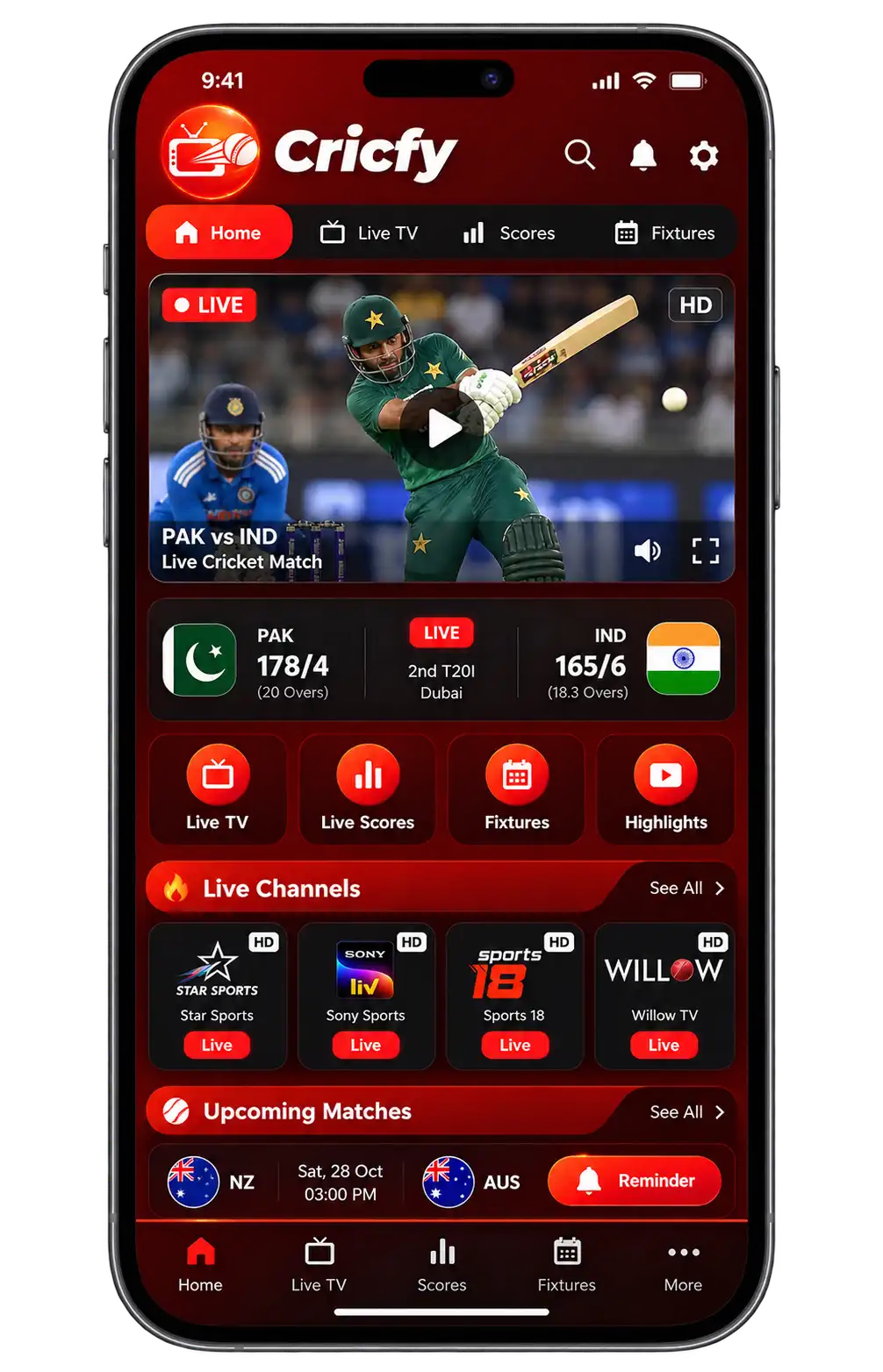
Cricfy app is a sports streaming application made around live cricket. It gives users a simple way to follow matches on Android devices. The app is mainly used for live cricket streams and scores. Users can open the app and look for available matches. It also includes live scores beside supported streams. This can make following a match easier during busy hours. The app is presented as a free service without account registration. Public information lists support for Android phones, tablets, and TV devices. Some versions also include sports channels outside regular cricket coverage. The interface is kept dark and fairly simple for regular use. Users can also find match reminders and a floating player. These options add some convenience during live matches.
The cricfy app APK is usually installed directly on Android. It is not normally installed through the Google Play Store. The current public download page lists version 6.6 and about 22 MB. It also lists Android 5.0 or newer as the requirement. Different websites may show different Cricfy versions. Because of this, the version number can change between sources. Some users also search for cricfy app Download pages for newer files. Searches for cricfy app Mod can also appear on third-party websites. Those files can have different features and different risks. The exact app experience can therefore depend on the file installed. Users should check the file details before installing any APK.
Cricfy App Information Table
| App Detail | Information |
| App Name | Cricfy TV |
| Version | 6.6 |
| Developer | Not clearly listed |
| File Size | About 22 MB |
| Android Requirement | Android 5.0+ |
| Category | Sports & Entertainment |
| Last Updated | 2026 |
| Price | Free |
The listed version, size, Android requirement, and category come from the current public Cricfy download page.
What is the Cricfy App?
Cricfy app is an Android-based application for watching sports streams. Cricket is the main focus shown across its public pages. Users can look for live matches and available sports channels. The app also provides a built-in score section for ongoing games. This section can show scores, wickets, and run information. Some versions also show upcoming fixtures and match reminders. The app can be used on Android phones and tablets. Android TV and Amazon Fire TV are also listed as supported devices. Chromecast support is mentioned for compatible setups too.The main purpose is keeping live sports together in one place. It is made around quick access rather than complicated menus.
The app is also used by people who want simple match access. Users do not normally need to create an account. Public information describes the service as free to use. It also lists channels connected with cricket and other sports. These include names such as Star Sports, Willow, Fox Cricket, and PTV Sports. Available channels can change from one version to another. This happens because APK files may come from different sources. The app is distributed outside the normal Play Store system. This means installation is usually done through an APK file. Users need to allow installation from the browser or file manager. The setup itself is generally simple on supported Android devices.
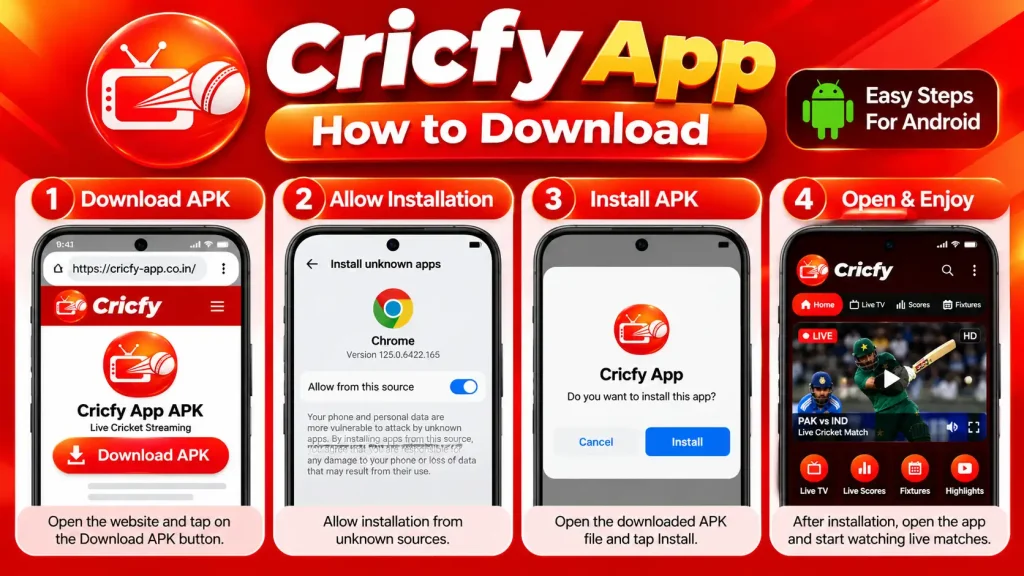
How to Download, Install, and use cricfy app?
- Open a trusted browser on your Android device.
- Search for the current Cricfy app APK file.
- Check the version and file size before downloading it.
- Tap the download button and wait for completion.
- Open the downloaded APK from your notification panel.
- Allow unknown app installation if Android asks for permission.
- Return to the APK file and tap the Install option.
- Wait while Android finishes the installation process.
- Open Cricfy from your phone’s application menu.
- Look through the available sports or cricket sections.
- Select a live match or available channel.
- Use the player controls while watching the stream.
The exact screens can look different between Cricfy releases. Some builds may also use different menus or player layouts.
Features of cricfy app
Live Cricket Streaming
The main feature is access to live cricket streams. Users can look through available matches and channels. Different streams may appear depending on current availability. This makes the app useful for following live cricket in one place.
Built-In Live Scores
Cricfy includes a live score section with supported matches. Users can check runs, wickets, and other match details. The score information can be viewed while following the game. This is useful when watching is not possible all the time.
HD Streaming
The app promotes HD streaming for supported sports channels. Picture quality can depend on the selected stream and internet connection. Some available channels may provide higher quality than others. Users can therefore see different quality between separate streams.
Multiple Sports Channels
Cricfy provides access to many sports channels in its listings. Cricket channels are a major part of the service. Public information mentions more than 200 channels across supported categories. The actual channel list can change with different releases.
Match Reminders
The app includes reminders for some upcoming matches. Users can set an alert for the start of selected games. This can help when a match starts during another activity. Reminder availability may depend on the current app version.
Floating Player
A floating player is available in supported versions of Cricfy. It allows the video to stay visible while using other areas. Users can check the score while the match remains on screen. This gives more flexibility during multitasking.
Data Saver Mode
Some Cricfy versions include a lower-quality streaming option. This mode can help reduce data use during live viewing. It may be useful when mobile data is limited. Lower quality can also reduce the amount of data used per hour.
Custom Playlists
Supported builds can allow users to add custom M3U streams. This gives users another way to organize available network streams. A playlist can keep selected feeds together for easier access. This feature is mainly useful for users who already have compatible streams.
Dark Interface
Cricfy uses a dark-style interface in its current public presentation. The darker design keeps the main screen fairly simple. Menus and sports categories are placed around the streaming content. This can make regular browsing feel more straightforward.
Live and Upcoming Matches
The app can show current and upcoming sporting events. Users can check which matches are running or coming soon. This saves some time when looking for a particular game. The available event list depends on the current release and streams.
Fast Channel Switching
Recent release information mentions improvements to channel switching. Users can move between available channels without leaving the main app. This can be useful when one stream has problems. The exact switching speed still depends on the internet connection.
Chromecast Support
Chromecast support is listed for Cricfy on compatible devices. Users can send supported streams to a larger screen. This can make watching easier from a phone. Device compatibility and stream support can vary between releases.
Android TV Support
Cricfy is also presented for Android TV devices. Users can install compatible APK files on supported TV hardware. The larger display can make sports viewing more convenient. The exact installation method depends on the TV device.
No Account Requirement
The public Cricfy page says an account is not required. Users can open the app without creating a normal profile. This keeps the initial setup fairly short. It also means there is less account information to enter.
Free Access
Cricfy is presented as a free application on its public pages. Users are not shown a normal monthly subscription for the app. This is one reason APK searches are common around the service. Availability and stream access can still change between releases.
Cricket Score Panel
The Cric Score panel puts match information near the stream. Users can check ball-by-ball details and run rates. Recent release notes mention improvements to this score panel. This gives users another way to follow the match when viewing changes.
Lightweight APK Size
The current public page lists an APK size around 22 MB. This is relatively small compared with many large streaming applications. A smaller installation file can make downloading easier on limited connections. However, stream data itself still uses internet bandwidth.
Recent Performance Changes
Recent release notes mention faster channel switching and player improvements. They also mention general bug fixes and performance changes. These updates are intended to make normal use smoother. The actual result can still differ across phones and Android versions.
Upcoming Fixture Information
Users can view upcoming fixtures through supported versions. This gives a simple place to check future matches. Some fixtures can also have reminder options. The displayed schedule depends on the current version and available event data.
Pros and Cons of cricfy app
Pros
- Simple interface for regular sports viewing.
- Focuses mainly on live cricket content.
- Live scores are available for supported matches.
- Many sports channels can appear in the app.
- Some versions support HD streaming.
- Match reminders are available in supported builds.
- Floating player support can help with multitasking.
- Android TV support is available.
- Chromecast support is listed for compatible devices.
- No normal account registration is required.
- The APK file is relatively small.
- Some versions include data-saving options.
Cons
- It is not normally available through Google Play Store.
- Stream availability can change without much notice.
- Different APK sources may provide different versions.
- Some streams may stop or fail during matches.
- Features can differ between separate releases.
- Third-party APK files can carry security risks.
cricfy app vs Official Cricket Streaming Apps
Many users compare cricfy app with official sports applications. The main difference is how the content is provided. Cricfy is distributed as an APK and collects different sports streams. Official apps normally operate under a specific sports network or service. They can also have proper store support and regular updates. Cricfy can provide a wider mix of channels in one place. The official apps usually have clearer support for their own content.
| Feature | cricfy app | Official Sports Apps |
| Live Cricket | Yes | Yes |
| Multiple Networks | Available | Limited |
| Play Store Support | No | Usually Yes |
| Account Required | Usually No | Often Yes |
| Official Content | Varies | Available |
| Match Scores | Yes | Available |
| Android TV | Supported | Often Supported |
| Free Access | Yes | Free/Paid |
| Regular Updates | Varies | Available |
Cricfy gives users a different way to access sports streams. It can place different channels and matches in one application. Users may also find cricket scores and upcoming fixtures inside the same interface. The APK format makes installation different from normal Play Store apps. Users need to download the file and install it manually. The available streams can also change between releases and sources.
Official sports apps work differently in several areas. They normally come directly from the broadcaster or service provider. This can provide clearer support, updates, and account management. Some official services also provide paid subscriptions for selected sports. Play Store support is commonly available for these applications. Their content can still be limited to the rights held by that service. The difference is mainly in distribution, content sources, and support.
cricfy app Alternatives
Some users look for other sports apps when a stream is unavailable. Other applications can provide live scores, match schedules, or sports coverage. The available content depends on each service and region. Below are some real apps that users may also consider.
ESPN
ESPN is a large sports service with cricket coverage in selected regions. Its apps provide scores, fixtures, news, and live sports where supported. Cricket coverage depends on local broadcasting rights and available subscriptions. The app is more focused on official sports content than Cricfy. Users can also find information about many sports in one place. Some live features require a subscription or television provider.
Willow
Willow is a cricket-focused streaming service mainly connected with cricket coverage. It provides live matches, schedules, scores, and related cricket content. Availability depends on the user’s location and subscription plan. Compared with Cricfy, Willow is more focused on official cricket broadcasting. It can also provide dedicated coverage for selected cricket tournaments. The service is commonly used through supported mobile, TV, and web platforms.
Sony LIV
Sony LIV provides entertainment and sports content in supported regions. Its sports section can include cricket competitions and live matches. The exact cricket availability depends on current broadcasting rights. Users can watch supported content through the mobile application and other compatible devices. Compared with Cricfy, Sony LIV is a larger official streaming service. It can also include movies, television programs, and other entertainment content.
JioHotstar
JioHotstar is an Indian streaming service with sports and entertainment content. Its sports section can include cricket depending on current rights and availability. Users can access supported matches through compatible devices and plans. The service is different from Cricfy because it operates as an official streaming platform. It also provides other entertainment content besides sports. Availability can depend on location and account requirements.
FAQs
What is cricfy app?
Cricfy app is an Android sports streaming application. It mainly focuses on live cricket and sports channels. It also provides scores and some upcoming match information.
Is cricfy app free to use?
Cricfy is presented as a free application on its public website. Users can download and install the APK without a normal subscription. Some streams can still depend on current availability.
Is cricfy app safe to use?
Safety depends on where the APK file comes from. Third-party APK files can have security risks. Users should check the source and scan downloaded files before installation.
Is cricfy app available on the Play Store?
Cricfy is generally distributed as an APK outside Google Play Store. Users normally download the installation file separately. This means Android may ask for permission to install unknown applications.
Does cricfy app require root access?
The normal installation does not require root access. Users can install the APK on compatible Android devices. Android may still require permission for installation from an outside source.
Can I use cricfy app on Android TV?
Android TV support is listed for Cricfy. Users need a compatible APK version for their TV device. Installation can be done through a supported file transfer or browser method.
Does cricfy app work on iPhone?
The normal APK version is made for Android devices. Android APK files cannot be installed directly on iPhones. iOS users would need an official compatible version or another supported service.
Can cricfy app be used on a PC?
An Android emulator can be used for Android APK applications. Users can install a compatible emulator on Windows and then install Cricfy. Performance depends on the computer and emulator settings.
Conclusion
Cricfy app is mainly used for live sports and cricket viewing. Its interface keeps the main functions fairly simple. Users can look for matches, channels, scores, and fixtures from the application. The service is also presented as a free application. Some versions provide features such as a floating player and match reminders. Android TV and Chromecast support are also listed for compatible devices. The APK is normally installed outside the Google Play Store. This makes the installation process a little different from normal applications. Users may need to enable APK installation before setting it up. The available channels can also change over time. Different versions may have different menus and streaming options. Some users may therefore see different features after installing another release.
The app also provides several functions around live cricket. Users can check scores while following a match. They can also look through upcoming fixtures when supported. Some releases include data-saving options for users with limited mobile data. The application can work on phones, tablets, and supported television devices. Its relatively small APK size can make the initial download simple. However, the actual streaming uses much more data than the APK itself. Stream quality also depends on the selected channel and internet connection. Users may see HD options on some available streams. Other streams can have lower quality or temporary problems. These differences can happen because streams and releases are not always the same. The app therefore has several simple functions for regular sports viewing.

